
Knowledge Base
- Home
- Roles ▼
- Registration ▼
- Main Dashboard ▼
- Project Management ▼
- Crew Management
- Resource Management ▼
- Form Builder ▼
- Safety Management ▼
- Documentation Management ▼
- New Submission
- Global Communications
- Timesheet Management ▼
- Reports ▼
- Chats
- Time Off Management
- Profile
- Subscriptions
- Location Tracking Behavior on iOS and Android
- FAQs
- Troubleshooting
Geo-Cx Role Overview
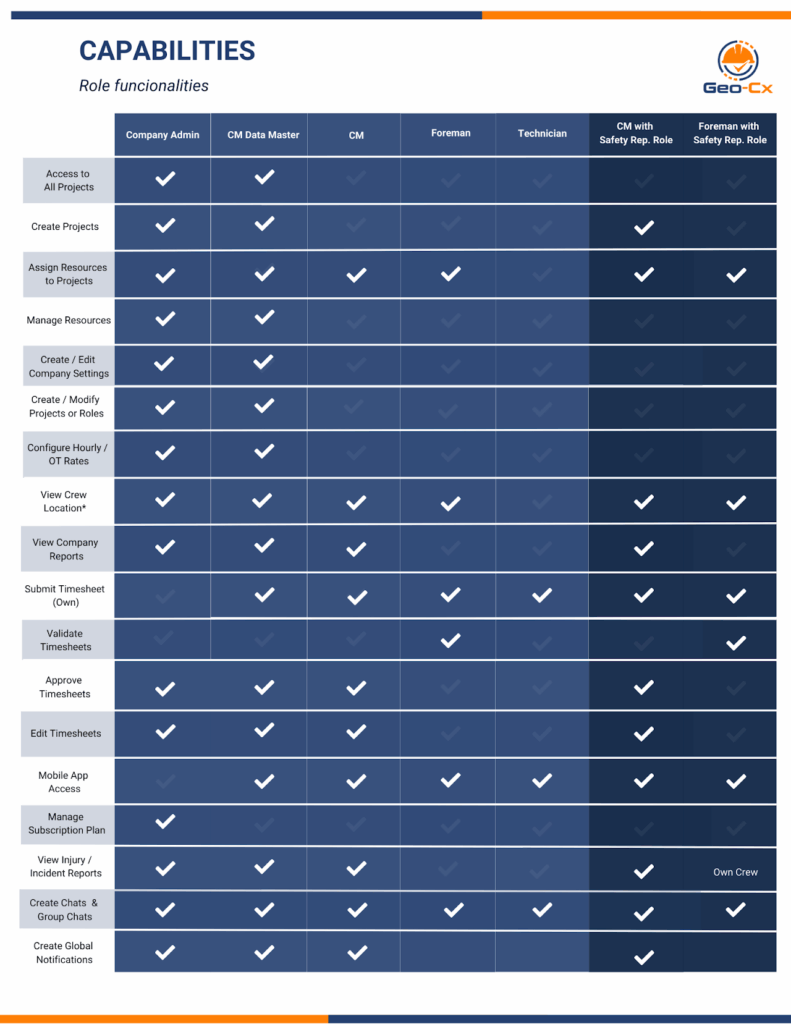
In Geo-Cx, we offer five distinct roles to suit the needs of your organization. Here are some initial recommendations to help you begin your journey. Below, you’ll find brief descriptions of each role.
Company Admin
The Company Admin is the main account owner and decision-maker. This role oversees all company operations within Geo-Cx, from project creation and resource assignment to license management and billing.
Responsibilities:
Manage company profile, users, and roles
Purchase and assign licenses
Configure hourly and overtime rates
Oversee all projects, crews, and timesheets
Monitor performance metrics, safety reports, and QC audits
Approve or reject project-level data (e.g., timesheets, expense requests)
Permissions / Access:
Full access to all modules: Projects, Resource Management, Safety, Timesheets, and Reports
Can create, edit, or deactivate any user (Construction Manager, Foreman, Technician)
Can send platform invitations via email (Play Store / App Store link)
Can view and export reports (PDF and Excel)
Can manage subscriptions, projects and company settings
Construction Manager
The Construction Manager supervises field operations across multiple projects. This role bridges the office and jobsite, coordinating Foremen and Technicians to ensure work progress, safety compliance, and data accuracy.
Responsibilities:
Create and manage construction projects
Assign Foremen and Technicians to crews
Review and approve timesheets
Track project progress, productivity, and quality metrics
Conduct or review safety and QC inspections
Generate reports for management and clients
Permissions / Access:
Full access to assigned projects and their related data
Can add or manage Foremen and Technicians
Can enable permissions like “Add Manual Time” for others (Master Data Management only)
Can view reports and analytics for assigned projects
Cannot purchase licenses or edit company-level settings
Construction Manager (with Master Data Management)
This role is designed for Construction Managers who require extended administrative privileges within Geo-Cx. It bridges the gap between standard Construction Managers and full Company Admins, allowing for greater operational control while maintaining license management restrictions.
Responsibilities:
Create and configure new projects across the company.
Add and manage resources (Construction Managers, Foremen, Technicians).
Set and adjust hourly rates and overtime rates.
Monitor and oversee company budgets and project cost allocation.
Maintain master data consistency for personnel, projects, and cost centers.
Foreman
The Foreman is the on-site leader responsible for crew coordination, task execution, and daily reporting. This role ensures that work performed by Technicians aligns with project schedules and quality standards.
Responsibilities:
• Validate timesheets and field activity logs
• Report on safety observations, and QC findings at crew level (Safety Rep. only)
• Communicate field issues or delays to the Construction Manager
• View Technician locations on map (own crew only)
Permissions / Access:
• Can view and manage assigned projects and crew data
• Can validate or validate with comments Technician entries (e.g., punches, timesheets)
• Can submit Safety and QC forms (Safety Rep. only)
• Can attach photos, comments, and notes from mobile app
• Cannot create new users or modify company settings
Technician
The Technician performs the fieldwork — logging time, completing assigned tasks, and reporting jobsite activities directly through the Geo-Cx mobile app.
Responsibilities:
• Punch in/out using GPS-based time tracking
• Complete assigned daily tasks or checklists
• Report incidents or injuries
• Submit own timesheet
Permissions / Access:
• Can access only assigned projects and tasks
• Can submit own timesheets
• Can view personal work history and attendance records
• Cannot edit other users, create projects, or access company analytics
Safety Representative (Safety Rep.):
This role is assignable to Construction Managers and Foremen to enhance project safety. Safety Reps are alerted to pending audits and can view submitted audits, as well as injury and incident reports.
Company Admin
Primarily oversees platform operations. While typically not granted app access, if your company is small and lacks a Construction Manager, the Company Admin can assume this role. This dual role enables access to all Construction Manager features within the app. Check more details here.
Construction Manager
Manages construction operations and has full access to relevant app and web features.
Foreman
Supervises crews and construction activities, with access tailored to on-site management needs also has access to relevant app and web features.
Technician
Specializes in hands-on technical tasks and uses the app for day-to-day operational support. Technicians only have access to the mobile app.
Safety Representative (Safety Rep.):
This role is assignable to Construction Managers and Foremen to enhance project safety. Safety Reps are alerted to pending audits and can view submitted audits, as well as injury and incident reports. Assign this role during the project staffing process, for both individuals and crews.