Knowledge Base
- Home
- Roles ▼
- Registration ▼
- Main Dashboard ▼
- Project Management ▼
- Crew Management
- Resource Management ▼
- Form Builder ▼
- Safety Management ▼
- Documentation Management ▼
- New Submission
- Global Communications
- Timesheet Management ▼
- Reports ▼
- Chats
- Time Off Management
- Profile
- Subscriptions
- Location Tracking Behavior on iOS and Android
- FAQs
- Troubleshooting
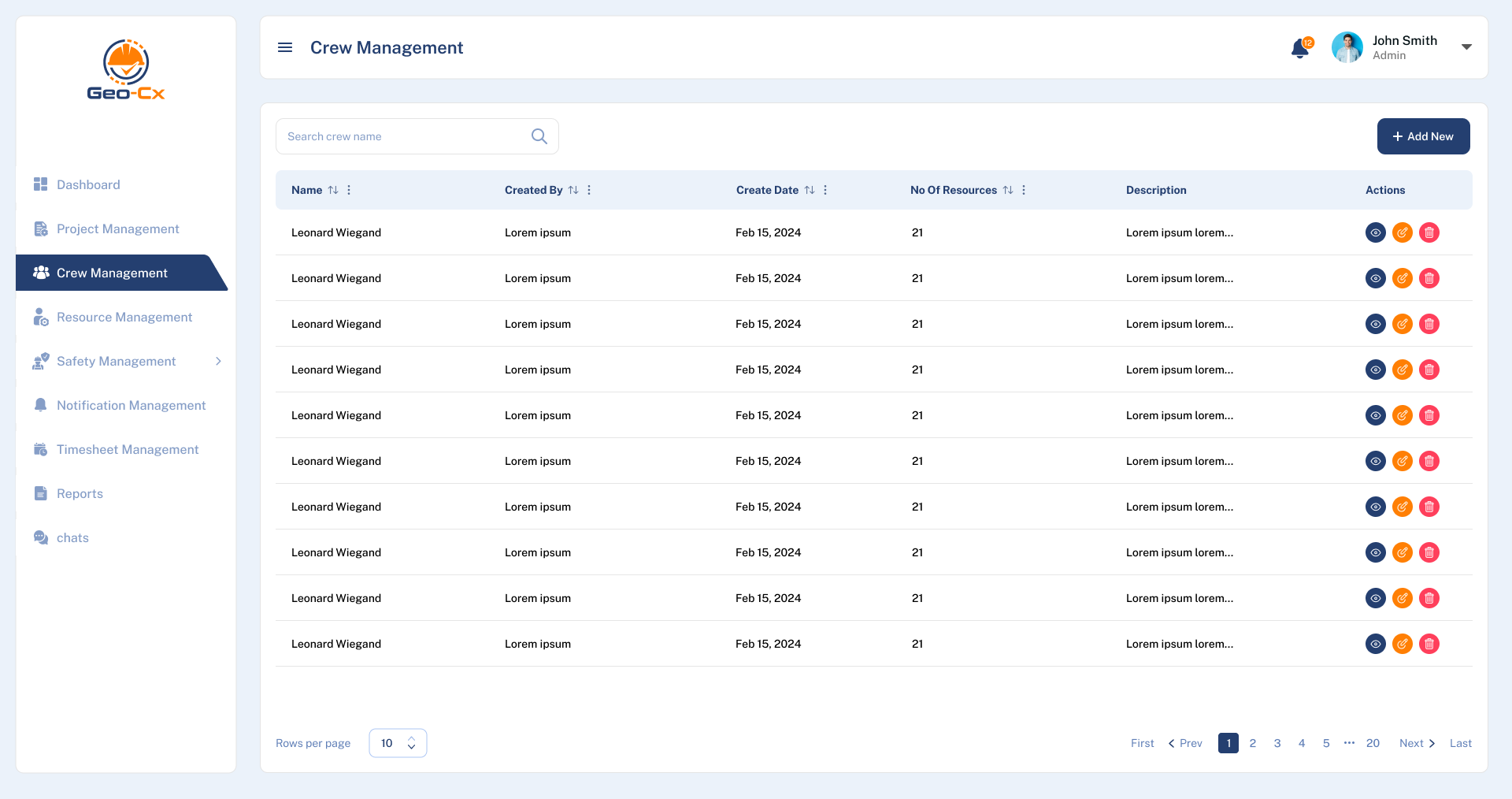
Crew Management
Crew Listing:
Each crew has a row displaying details such as the crew name, who created the crew, the date it was created, the number of resources assigned, and a brief description if provided.
Actions:
To the right of each crew’s information, there are action buttons to:
View details about the crew (eye icon),
Edit crew details (pencil icon),
Manage crew resources (users icon),
Delete the crew (trash bin icon).
Add New Crew:
The “+ Add New” button located at the top right corner allows users to create new crews. This will open a form where you can enter details such as the crew’s name, resources, and description.
Crew Name: Enter the name of the new crew you wish to create. This is a mandatory field, as indicated by the asterisk (*).
Description: Provide a brief description of the crew’s purpose, tasks, or any other relevant information. This field is optional but can be useful for distinguishing between crews with similar names or functions.
Select Resources: This dropdown allows you to add existing resources (such as personnel or equipment) to the crew. You can search for specific resources by name to add them to the crew. This is crucial for assigning the right personnel and tools needed for the projects the crew will undertake.
Save: Click this button to save the new crew with the details you have entered. This action creates the crew and registers it within the system.
Cancel: Click this to exit the form without saving any changes. This is useful if you decide not to create a new crew at the moment.
Search and Pagination:
- At the top, there is a search bar to quickly find specific crews by name. Below the crew list, there are options to navigate through different pages and adjust how many rows are displayed per page.
This interface is designed to efficiently manage and oversee multiple crews, providing essential tools for organization and access to crew details swiftly. If you need to add, modify, or delete crew information, you can do so through the actions column corresponding to each crew.
Important: Once a crew is created, it should be added to a project in order to show metrics in the Crew Strength Dashboard. See how to add a crew in Project Management.