
Knowledge Base
- Home
- Roles ▼
- Registration ▼
- Main Dashboard ▼
- Project Management ▼
- Crew Management
- Resource Management ▼
- Form Builder ▼
- Safety Management ▼
- Documentation Management ▼
- New Submission
- Global Communications
- Timesheet Management ▼
- Reports ▼
- Chats
- Time Off Management
- Profile
- Subscriptions
- Location Tracking Behavior on iOS and Android
- FAQs
- Troubleshooting
Location Tracking Behavior on iOS and Android
This section explains how location tracking works on iOS and Android platforms, especially when apps request background access to location services. It clarifies why users may receive system notifications even if the app does not actively share or display the location.
1. iOS Location Tracking Behavior
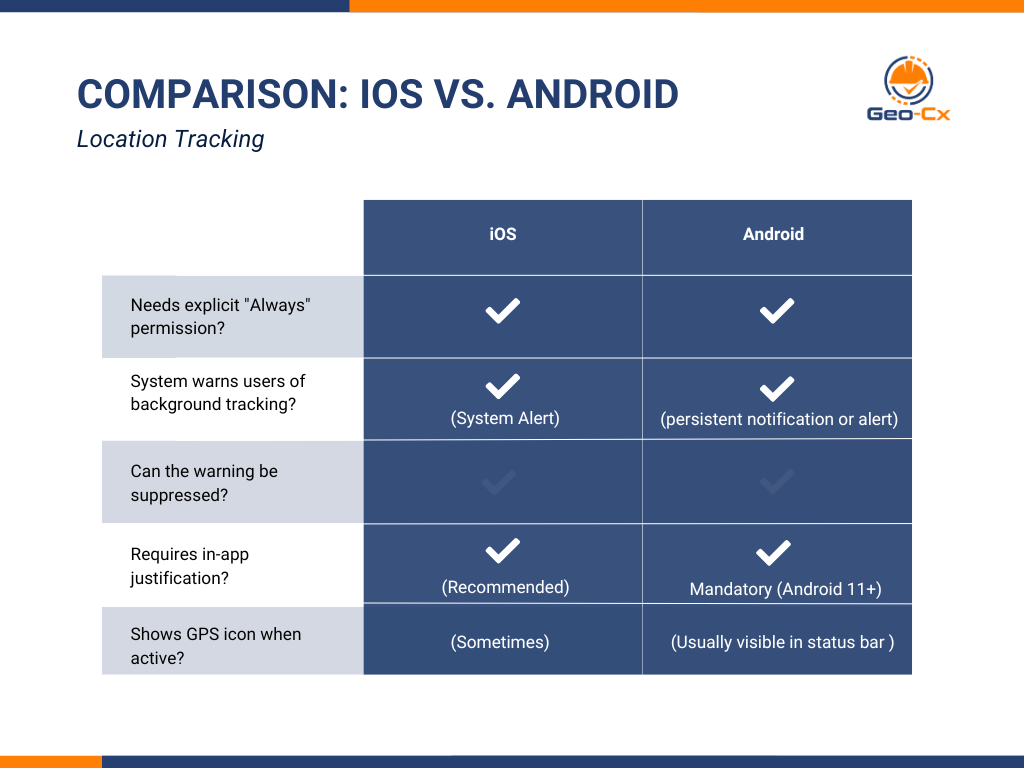
Apple enforces strict transparency regarding user location data. When an app is granted “Always Allow” location access, it can collect GPS data in the background. Even if the app does not share or display this information, iOS will notify the user if location services are being used.
Key Points:
iOS sends a system notification (e.g., “App X has used your location in the background”) when background location access is detected.
This applies even if the app disables in-app location sharing.
All apps with background location access are treated equally by iOS.
Examples of apps where this behavior applies:
Life360
Google Maps
Enterprise or workforce tracking apps
Recommendations for Developers:
Clearly explain in-app why location is needed, especially for background use.
Inform users that system notifications may appear, even when data is not shared.
Use onboarding screens or consent forms to maintain transparency.
Sample message for in-app explanation:
“This app uses your location in the background to ensure accurate check-in/out tracking, even if it’s not actively displaying your location. You may receive a system notification from your phone confirming this.”
Why iOS Sends These Warnings
Apple added this feature to:
Prevent apps from silently tracking users without their knowledge.
Give users visibility and control over which apps are collecting location.
So even if your app is designed to do background location tracking responsibly (like a workforce management app), iOS wants the user to be aware of that fact.
2. Android Location Tracking Behavior
Android’s behavior is similar to iOS, with additional policy requirements on newer versions. When an app is granted background location access, users may receive system alerts or see persistent notifications.
Key Points
Apps must request “Allow all the time” permission for background location access.
Android 10+ displays a persistent notification when an app uses location in the background.
Android 11+ requires developers to justify background location access when submitting to Google Play.
Users must manually grant background location access in settings.
Developer Best Practices:
Explain why background location is needed before requesting permission.
Use a foreground service with visible notification for continuous tracking.
Comply with Google Play policies to avoid app rejection.
Conclusion
Both iOS and Android are designed to protect user privacy by informing them when apps access location in the background. Even if location data is not shared or displayed, users will be notified. Developers should provide clear communication within the app to explain this behavior, especially in professional or workforce tracking contexts.