
Knowledge Base
- Home
- Roles ▼
- Registration ▼
- Main Dashboard ▼
- Project Management ▼
- Crew Management
- Resource Management ▼
- Form Builder ▼
- Safety Management ▼
- Documentation Management ▼
- New Submission
- Global Communications
- Timesheet Management ▼
- Reports ▼
- Chats
- Time Off Management
- Profile
- Subscriptions
- Location Tracking Behavior on iOS and Android
- FAQs
- Troubleshooting
Forms
Creation of Forms is only available for Company Admins and Construction Managers.
Creating and Managing Safety Forms
From the Safety Management menu, click on “Forms”. This brings you to the form management interface.
Creating a New Safety Form:
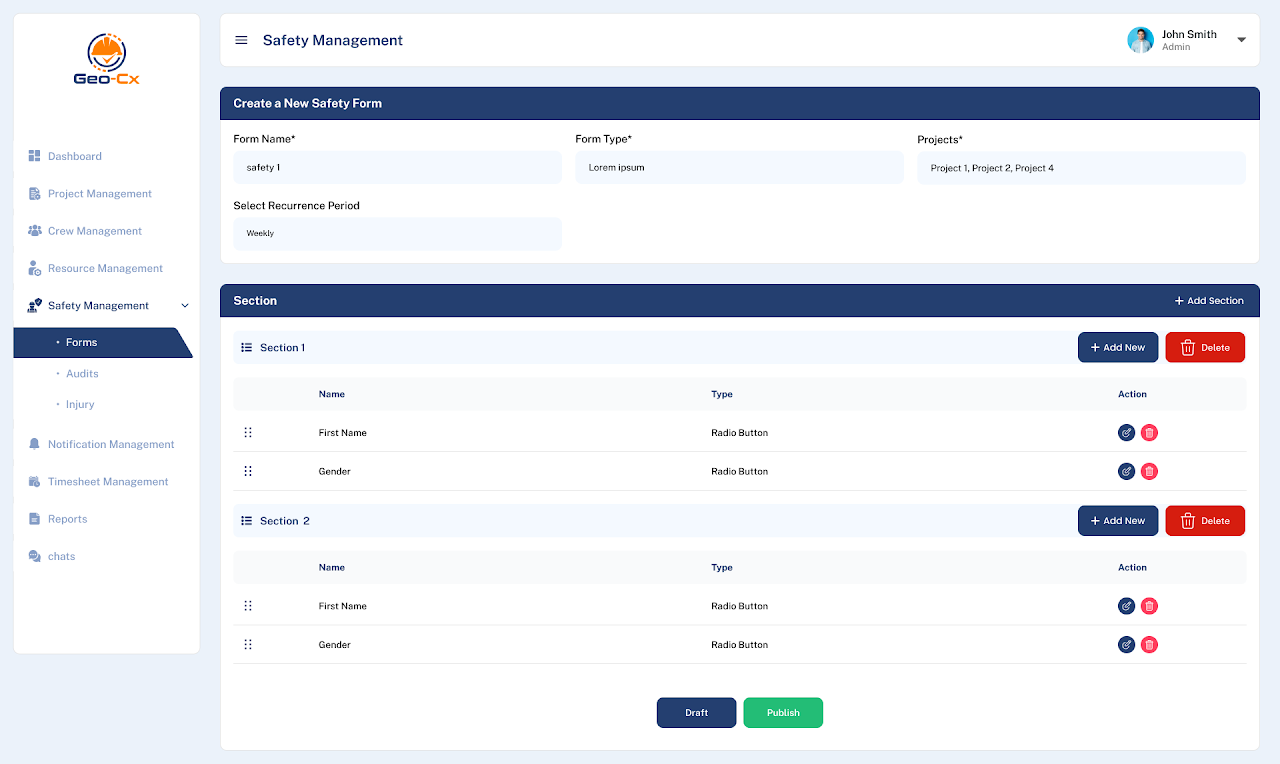
Click on the “+ Add New” button to start creating a new form.
Enter a name for the form in the “Form Name” field.
Choose the form type from a dropdown list (e.g., Daily Audit, Incident Report).
Select the recurrence period for Audits only (e.g., Weekly, Monthly) to specify how often the form should be filled out.
Assign the form to specific projects by selecting from the “Projects” dropdown.
Create sections and specify the types of inputs (e.g., Textbox, Radio Button, Checkbox) for each form field.
Select required fields when necessary.
After setting up all details, use the “Publish” button to make the form active or “Draft” to save and continue editing later.
Types of fields
Textbox: Allows you to enter text, such as names, email addresses, phone numbers, or descriptions.
Radio Button: Enables you to choose one option from a set of alternatives.
File Upload: Permits the uploading of files, including images and documents.
Signature: Provides a space to draw your signature, ideally using a mobile device. Alternatively, a mouse can be used on a computer.
Checkbox: Offers the ability to select multiple options from a list.
Select: Presents a dropdown menu for choosing one or several options.
Date Picker: Facilitates date selection via a calendar interface.
Resources: Enables the selection of employees within the organization.
Camera: Allows you to capture photographs, available exclusively within the mobile app.
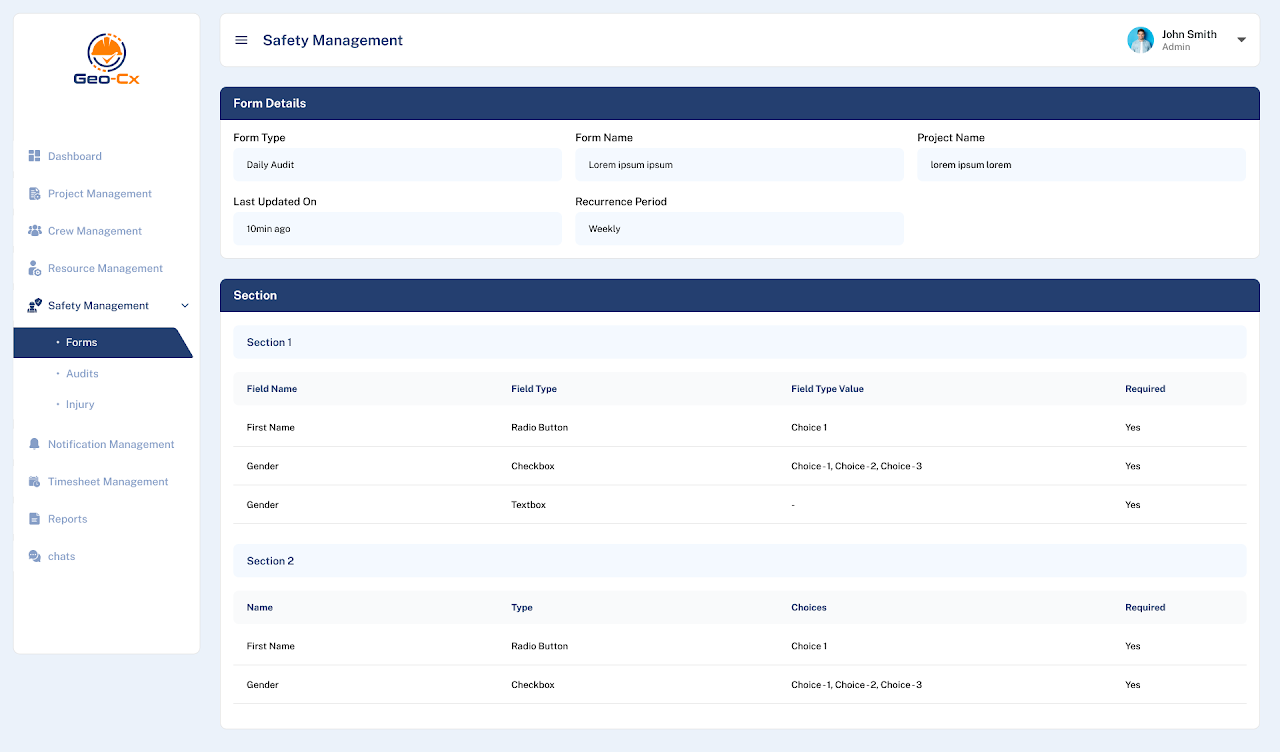
Viewing Form Details
In the Forms overview, click on the action menu (three dots) next to the form you wish to view and select “View”.
Details:
Displays all sections and fields of the form along with their types (e.g., Radio Button, Checkbox), choices available, and whether they are required.
You can see the form type, last updated time, and associated projects.
This page allows for detailed review and ensures that all necessary fields are correctly configured before publishing.
Managing Existing Forms
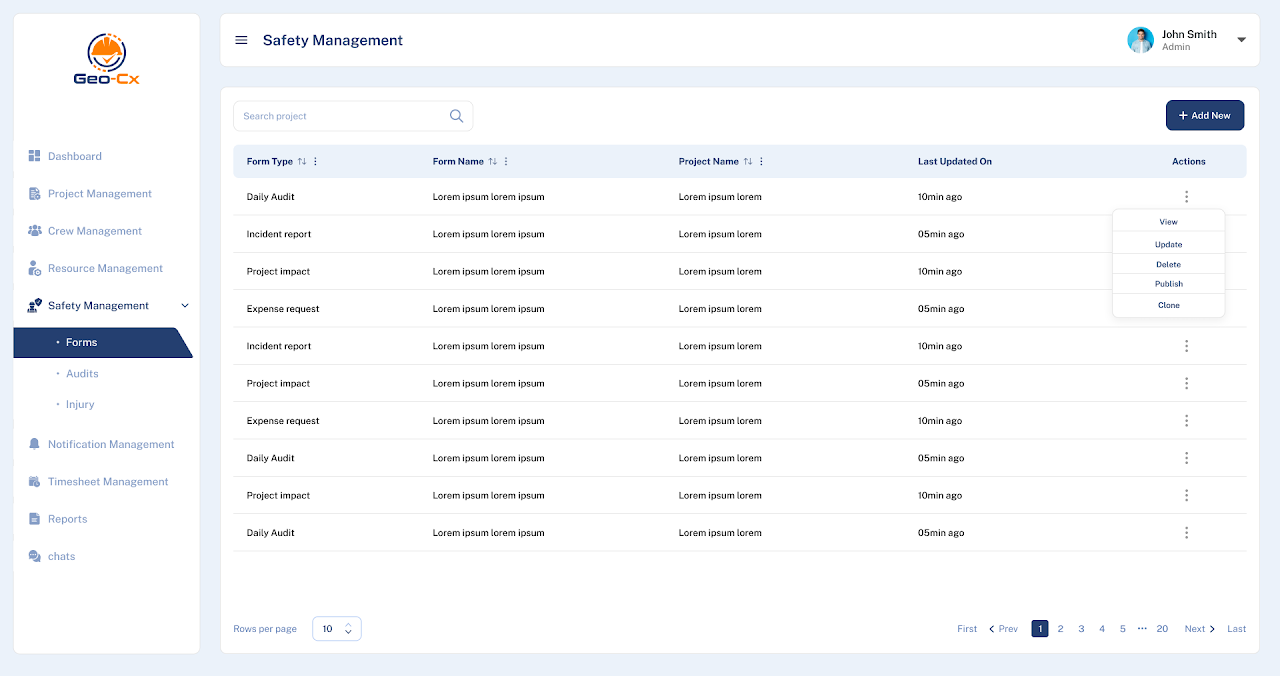
Overview of Forms: Navigate to the Forms main page to see a list of all existing forms with details like form type, form name, associated project, and the last update time.
Editing and Updating Forms:
Use the action menu to edit, delete, or clone a form.
Editing allows you to modify any aspect of the form, such as field types or the recurrence period.
Cloning is useful for creating a new form with similar settings as an existing one. Make sure to assign a different name before publishing.
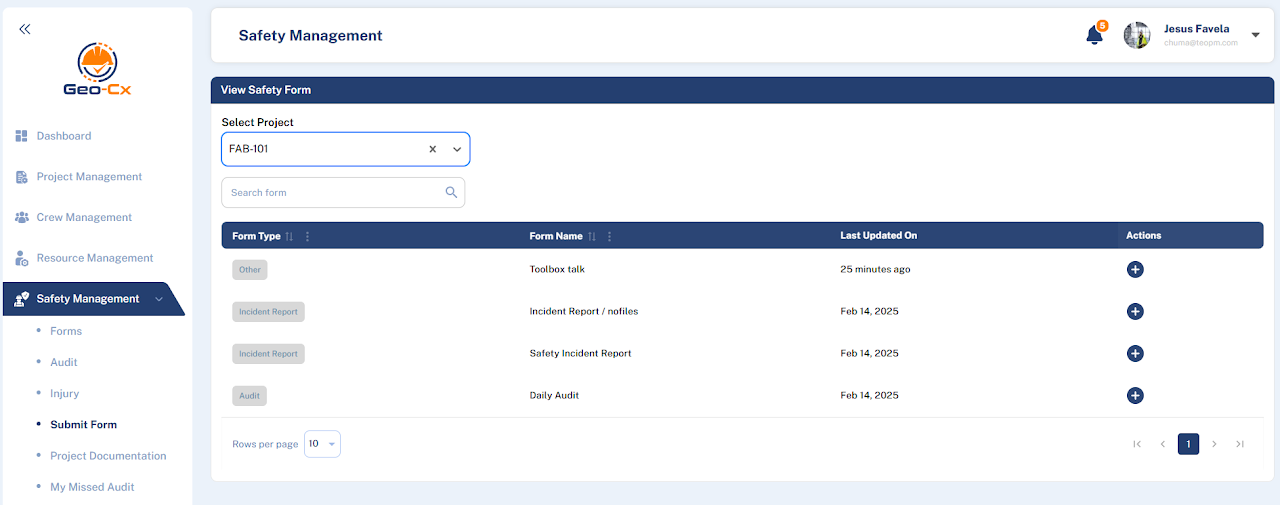
Project Forms (Web)
Submission of Forms is available for Company Admins, Construction Managers and Foremen.
The “Submit Form” feature in the Safety Management section of the Geo-Cx platform is designed to facilitate the easy submission of various types of safety-related documents. This process ensures that all safety documentation is up-to-date and accessible for audits and reviews.
Access the Safety Management Section:
From the dashboard or any other page within the Geo-Cx platform, navigate to the left sidebar.
Click on “Safety Management” to expand the dropdown menu.
Choose ‘Submit Form’:
Within the Safety Management menu, select “Submit Form”. This action will direct you to the form submission page.
Select the Type of Form:
Choose the specific type of safety form you need to submit from a predefined list. This could include incident reports, daily audits, or other relevant forms.
Fill Out the Form Details:
Enter all required information specific to the type of form you are submitting. This may include details such as the date of the incident, involved personnel, description of the event, and any preventive measures suggested.
Attach Any Supporting Documents:
If your form requires any attachments like photos, documents, or other files, use the provided options to upload these files. Ensure that all attachments are clear and pertinent to the form’s content.
Review and Submit:
Before submitting the form, review all entered information and attached files to ensure accuracy and completeness.
Click the “Submit” button to send the form for processing.
Additional Features
Search Functionality: If you need to reference previously submitted forms or check the status of current submissions, use the search bar to find specific forms quickly.
Form Filters: Utilize filters to sort forms by type, date, or other criteria to easily manage and track submissions.
Best Practices
Timely Submission: Always submit safety forms as soon as possible after the event or audit to ensure timely action and compliance with safety regulations.
Accuracy: Double-check all information for accuracy to avoid delays in processing and potential safety risks.
Submit Forms (App) – Construction Manager & Foreman
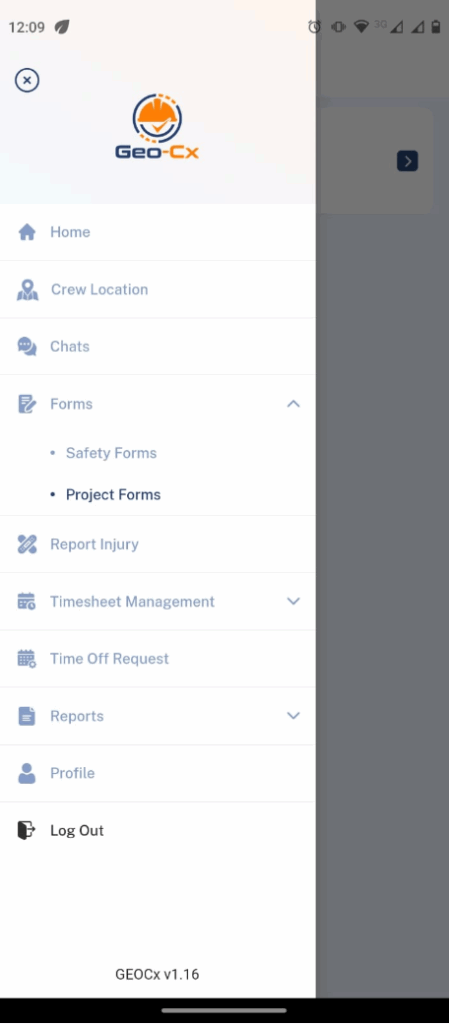
The “Submit Form” feature in the Safety Management section of the Geo-Cx platform is different in the App Menu, you need to select Forms from the Side Menu and select “Project Forms”.
Check the detailed steps below the images.
Project Forms Side Menu
Open the Navigation Menu: Tap on the hamburger icon (three horizontal lines) at the top left of the screen to open the navigation menu.
Navigate to Forms: Tap on “Forms” to expand the submenu.
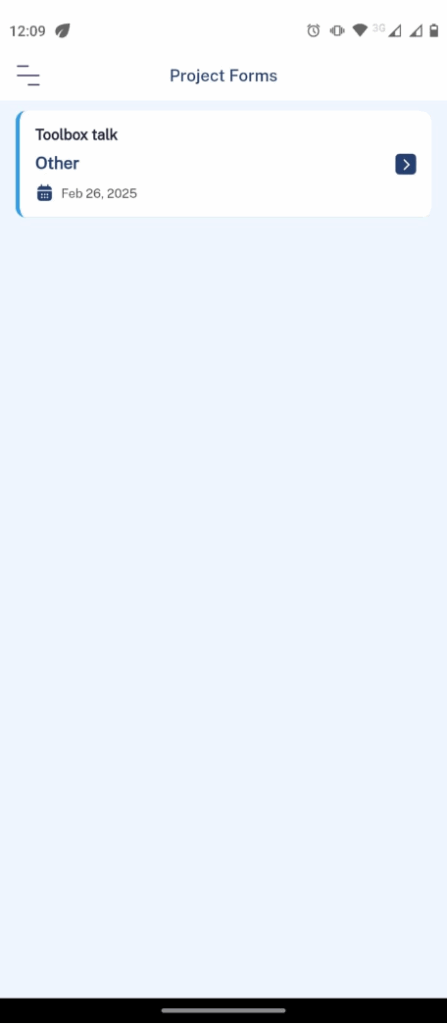
Select Project Forms: Within the forms submenu, select “Project Forms” to view the list of available project-related forms.
Project Forms
Once you are in the Project Forms section, you can fill out a “Toolbox Talk” form or any other project form as needed. It‘s important that the Construction Manager create first the necessary forms for the Projects.
Fill the form (Example)
Select the Form: Tap on “Toolbox Talk” from the list of project forms.
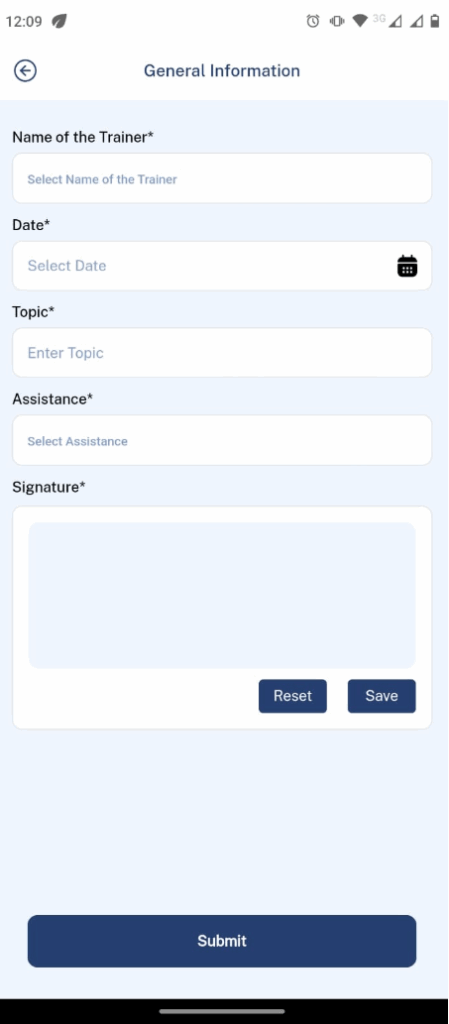
Enter General Information:
Name of the Trainer: Select the name of the trainer from a dropdown menu or enter it if the field allows typing.
Date: Tap on “Select Date” to pick the date of the training session from a calendar view.
Topic: Enter the topic of the toolbox talk.
Assistance: Indicate the specific participants if required.
Signature:
Sign the Form: Provide your signature in the designated “Signature” box. You might need to use your finger or a stylus on your device’s touchscreen to draw your signature.
Tap “Save” to save the signature you have entered.
Tap “Reset” if you need to clear the form and re-enter the signature.
Submit:
After filling out all the necessary fields and providing your signature, tap the “Submit” button at the bottom of the form to finalize and send the form for processing.